ONE SYSTEM, TOTAL CONTROL.

All Posts By

Ron SEO Team

Top 10 Tips for Managing Customer Relationships with Zoho One - Blog Image

Top 10 Tips for Managing Customer Relationships with Zoho One

By CRM Systems

Managing customer relationships well is one of the central ways businesses succeed. With the right customer relationship management (CRM) tools, you can keep track of customer information, stay on top of engagements, and build loyalty that lasts. Zoho One offers a powerful CRM and suite of business applications that help you achieve this with clarity and efficiency.

This article shares top 10 tips for managing customer relationships with Zoho One. Each tip focuses on practical steps, tools, and examples you can use to improve how you manage leads, customers, and ongoing interactions.


1. Centralise All Customer Data with Zoho CRM

Tracking customer information across spreadsheets, email, and sales notes can quickly become messy. One of the biggest advantages of a CRM system like Zoho CRM is that it gives you a single place to store contact details, communication history, deals, tasks, and notes.

Zoho CRM’s contact and lead management tools allow businesses to keep all data in one database. When every team member can see the same record — including emails, calls, tasks, and files — it reduces miscommunication and improves response times.

Tip: With centralised customer data, teams spend less time searching for information and more time building relationships that matter.

Did you know?

Zoho CRM is used by more than 250,000 companies globally to manage business relationships and ensure consistent service quality throughout the customer lifecycle.


2. Use Lead Scoring to Prioritise High-Value Prospects

Not all leads are created equal. Some are more likely to become paying customers than others. Lead scoring helps you rank prospects by engagement and readiness to buy, so your team can focus on the ones most likely to convert.

Zoho CRM lets you assign scores based on behaviour such as opening emails, visiting your website, filling out forms, or interacting with your content.

Tip: When high-value leads are prioritised, your sales team spends their time more effectively and converts more prospects into customers.

Did you know?

Zoho CRM can automatically trigger workflows or assignments based on a lead’s score, ensuring top prospects are followed up promptly.

Learn more about Scoring Rules – Manual Scores


3. Automate Follow-Ups with Workflow Rules

One of the biggest challenges in customer relationship management is keeping up with follow-ups. It’s easy for manual reminders to slip through the cracks. Zoho CRM’s workflow automation tools can help you automate tasks like follow-up emails, reminders, task creation, or status updates.

With workflows, you can set specific triggers (like when a lead moves to a new stage in your pipeline) and actions (such as sending an email or creating a follow-up task). This ensures key steps are always executed at the right time without constant manual effort.

Tip: Workflow automation reduces admin work and ensures timely communication with leads and customers.

Learn more about Configuring workflow rules


4. Track Every Customer Interaction in One Place

Customer interactions happen across many channels — phone, email, meetings, social media and support requests. Zoho CRM captures these interactions in a central timeline linked to each contact record.

This means every team member can see what has already been discussed or done, which helps prevent duplicate outreach and keeps conversations relevant.

Real-time notifications and activity tracking also ensure your team never misses important touchpoints.

Tip: By tracking interactions, you build a richer, more accurate understanding of your customers’ needs and preferences.

Did you know?

Zoho CRM can automatically capture emails, calls, social posts and support interactions directly into each customer record, giving you a complete view of engagement history.


5. Improve Customer Support with Zoho Desk Integration

Customer service and support are essential parts of relationship management. Zoho One includes Zoho Desk, which integrates smoothly with Zoho CRM. This integration lets your support team see customer records, issues, and history right inside the same CRM system.

With ticket tracking, automated assignment rules, service level monitoring and self-service portals, your support process becomes more structured. Teams can resolve issues faster and personalise service based on the customer’s history.

Tip: Integrated support tools help you deliver consistent service and increase customer satisfaction.


6. Segment Customers for Personalised Communication

Segmentation means dividing your customers into meaningful groups based on attributes such as purchase history, industry, location, interests, or engagement level.

Zoho CRM makes this easy with filters, tags, and custom views. Once segmented, you can tailor communication and offers to each group, which improves relevance and engagement.

Tip: Personalised messaging makes customers feel understood and valued — leading to higher satisfaction and loyalty over time.

Did you know?

Zoho CRM lets you create lists and views based on detailed conditions, such as “contacts with last contact older than 60 days” or “leads from a specific campaign,” which helps with targeted communication.


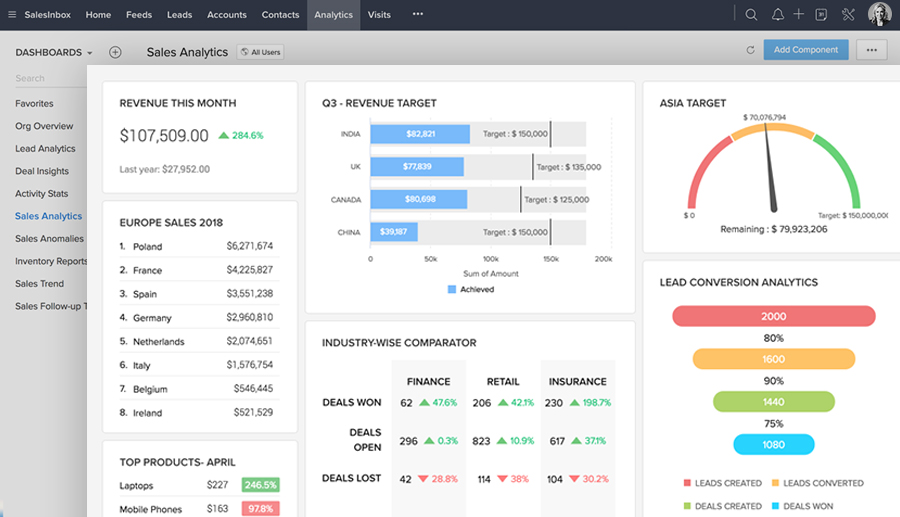
7. Use Analytics and Dashboards to Monitor Relationships

Understanding how your customer relationships are performing helps you make informed decisions. Zoho CRM offers powerful analytics and reporting tools. You can build custom dashboards that show key performance indicators like conversion rates, sales activities, pipeline value, customer satisfaction scores and more.  Analysing this data helps you identify where relationships are strong and where improvement is needed.

Tip: Regular analytics review helps you refine strategies and forecast future outcomes more confidently.


8. Collaborate Better with Zoho Cliq and Zoho Projects

Customer relationship management isn’t just about tools — it’s also about teamwork. Zoho One includes collaboration apps like Zoho Cliq (for messaging) and Zoho Projects (for task and project management).

Enable internal and external collaboration

When your sales, marketing and support teams can communicate directly, they share context and insights that improve customer outcomes. Linking CRM records to chats and projects ensures that everyone stays aligned.

Tip: Strong internal collaboration leads to better teamwork and faster resolution of customer issues.


9. Maintain Data Accuracy with Regular CRM Clean-Ups

Accurate customer data is crucial for good CRM performance. Duplicate records, incorrect fields or outdated information can lead to poor decisions and wasted effort. Regular data maintenance helps keep your CRM clean and reliable.

Zoho CRM includes tools for deduplication, data validation and clean-up workflows. You can merge duplicate contacts, update missing fields, and enforce standards for data entry.

Tip: Clean data ensures your team works with reliable information, improving customer communication and planning.


10. Train Your Team to Use Zoho One Effectively

Your CRM is only as good as how well your team uses it. Providing training and ongoing education ensures everyone knows how to maximise Zoho CRM features — from entering data correctly to following workflows and interpreting dashboards.

Here are a few training tips:

  • Provide role-based guidance so each team member understands relevant features.
  • Create simple process guides for common tasks.
  • Use in-app tutorials and learning tools.

Strong user adoption leads to higher quality data, faster responses, and stronger customer relationships.

Did you know?

Zoho offers in-app tutorials, help articles and AI guidance through its Zia assistant that can help users get up to speed quickly.

Make Zoho One Work the Way Your Business Does

Stop juggling tools and manual follow-ups. With the right Zoho One setup, you can manage leads, customers, support, and analytics in one connected system — built for growth.


Conclusion

Managing customer relationships with Zoho One and Zoho CRM gives you more structure, clearer communication, and faster reactions to customer needs. By centralising customer data, automating follow-ups, tracking interactions, analysing performance and training your team, you’ll create stronger, longer-lasting relationships.

At its core, CRM is about understanding people — their preferences, behaviours, needs and expectations. When that understanding is supported by the right tools, your business becomes more responsive, organised and customer-centric.

Zoho CRM Dashboard

How to Calculate Zoho CRM ROI: A Step-by-Step Guide

By Blog

Zoho CRM helps businesses manage customer relationships by tracking leads, sales, and interactions. Calculating its ROI (return on investment) reveals the value gained from costs, showing profits or savings per dollar spent. This process helps assess the tool’s effectiveness, identify improvements, and uncover benefits like higher sales or productivity, especially for small businesses and marketing teams.

This guide provides simple steps to calculate Zoho CRM ROI, using basic math and tools like Zoho CRM analytics. It covers data collection, formulas, and result analysis, incorporating metrics like lead conversion rates and sales growth. Features such as automation and reporting streamline tasks, while costs include subscriptions and training. With practical examples and clear explanations, this guide suits all users. Regular ROI checks optimise Zoho CRM use, aligning it with goals like more leads or faster deals for better decision-making.

This article keeps things straightforward. No need for advanced math skills. Just basic addition and division. Tools in Zoho CRM analytics help pull the data. Start with your goals in mind. What do you want from the CRM? More leads? Faster deals? ROI ties back to these. By the end, you can run your own calculation. Adjust it for your business. Regular checks keep Zoho CRM optimised. This leads to better decisions over time.

What is Zoho CRM ROI?

Zoho CRM ROI measures the financial return from using Zoho CRM. It compares costs to benefits. The result is a percentage. A positive number means the tool adds value. For instance, if ROI is 200%, you get back twice what you spent.

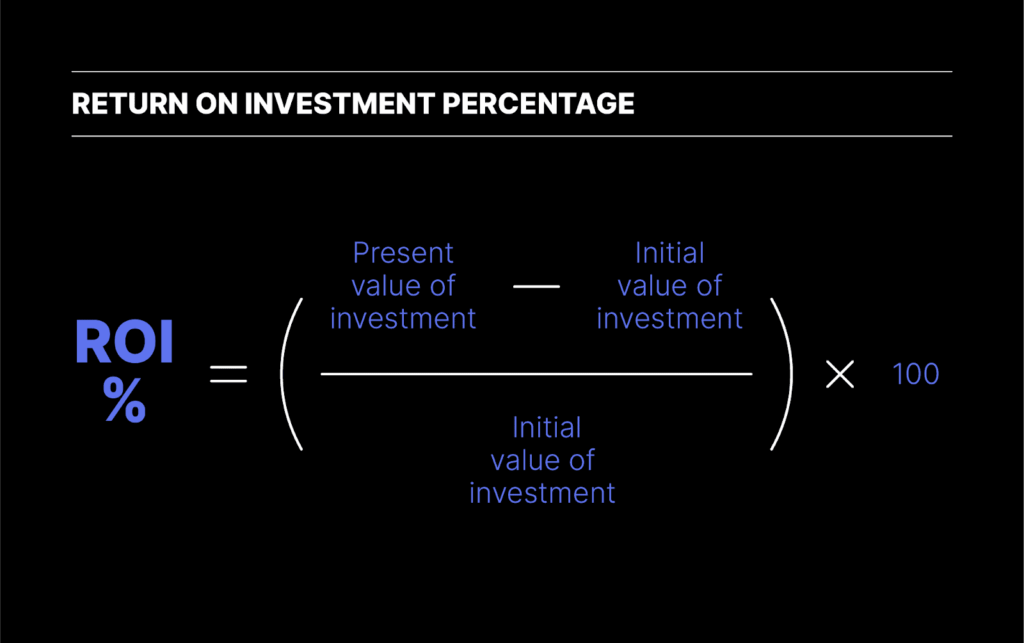
ROI calculation uses a basic formula. Subtract costs from gains, divide by costs, then multiply by 100. This gives the percentage. In Zoho CRM, costs include subscription fees and setup time. Gains cover increased sales and saved hours.

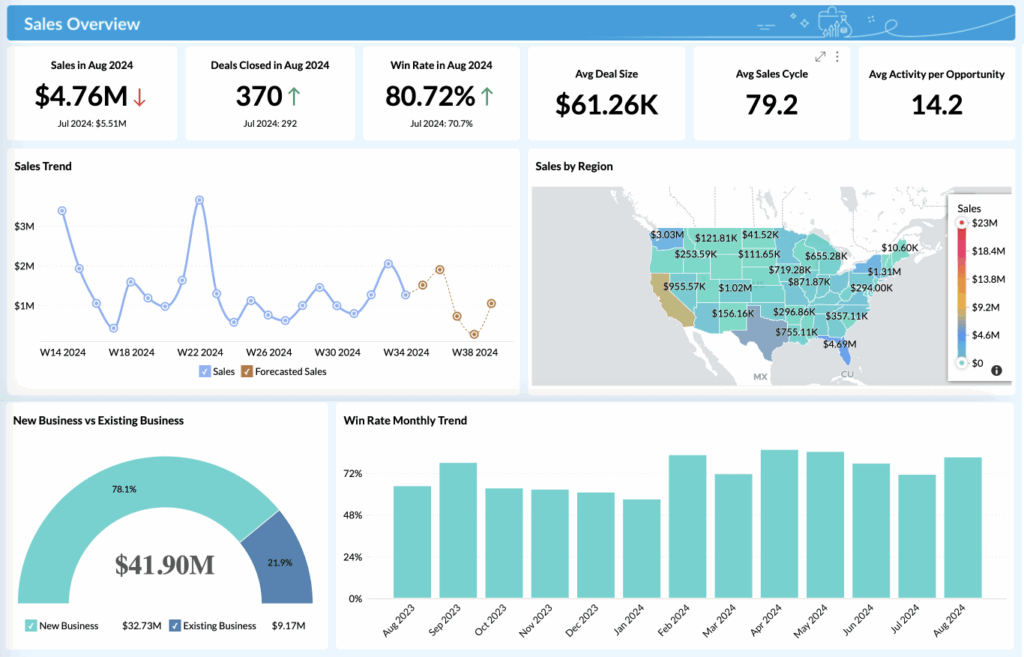
Zoho CRM Dashboard

Zoho CRM benefits extend beyond money. Better customer relationships lead to repeat business. Features like marketing automation boost efficiency. Zoho CRM analytics provide reports on leads and deals. These metrics help track progress. Consider Zoho CRM implementation. It involves training staff and migrating data. Once set up, it centralises information. Teams access details quickly. This reduces errors and speeds up work.

Semantic terms like measure CRM success apply here. They show how ROI fits into overall performance. Main keywords include Zoho CRM return on investment. Understanding this helps businesses evaluate tools.ROI is not just about sales. It includes customer satisfaction scores. Higher retention means long-term gains. Zoho CRM for small business often shows quick results due to its affordability.

On average, CRM systems offer a return on investment of $8.71 for every dollar s pent. This comes from research on various CRM platforms, including those like Zoho.

Why Calculate Zoho CRM ROI?

Knowing your Zoho CRM ROI helps make smart choices. It shows if the tool delivers value. Businesses gain clarity on spending. For example, high ROI justifies continued use. Low ROI signals changes needed. One key benefit is spotting inefficiencies. Zoho CRM metrics reveal weak areas. Perhaps lead conversion rates are low. Adjusting strategies can improve this. Sales growth CRM ties directly to ROI. Calculating ROI aids budgeting. See where money goes. Subscription costs versus revenue gains. This supports decisions on upgrades or add-ons. Zoho CRM features like automation save time, which adds to ROI.

Customer relationship management improves with data. ROI calculation includes retention rates. Happy customers stay longer, boosting profits. Businesses with strong CRM see better loyalty. Productivity rises too. Teams spend less time on manual tasks. Zoho CRM performance tracks this through reports. Semantic keywords like business ROI metrics highlight these advantages. For small businesses, ROI proves the tool’s worth. It helps compare with other options. Main keywords such as CRM return on investment guide evaluations. Overall, calculating ROI drives growth. It aligns tools with goals. Regular checks ensure ongoing benefits.

CRM can boost conversion rates by 300%. This statistic shows the potential impact on business operations.

Preparing to Calculate Zoho CRM ROI

To calculate Zoho CRM ROI, first gather all relevant data. List costs like subscription fees, training, and customisations. Then, identify benefits such as sales growth, time saved, and customer gains, using Zoho CRM analytics for accurate figures. Set a time frame, like a year or quarter, for consistent comparisons. Use spreadsheets or Zoho reports to export data on leads and deals. Understand key Zoho CRM metrics, like lead conversion rate, to guide your calculation. Finally, get input from sales and marketing teams to ensure a complete picture of the CRM’s impact.

Step-by-Step Guide to Calculating Zoho CRM ROI

Follow these steps to calculate your Zoho CRM ROI. Each one builds on the last. Use real data for best results.

Step 1: Identify All Costs

Begin by calculating all direct costs for Zoho CRM, starting with subscription fees, which depend on the chosen plan. Include any add-ons, such as extra storage. Next, account for implementation costs, like training sessions and data migration. Factor in indirect costs, such as staff time, by estimating hours spent and multiplying by their wage. Consider additional hardware or software expenses, like new computers for improved performance. Since Zoho CRM implementation may take weeks, include lost productivity during setup. Sum these amounts to determine the total investment.

Example: A small business pays $500 monthly for Zoho CRM. Training costs $2,000. Total yearly cost: $8,000.

Step 2: Measure the Gains and Benefits

To quantify Zoho CRM benefits, start by measuring revenue increases by comparing sales before and after implementation. Track higher lead conversion rates to see how many leads turn into customers. Calculate time savings from automation by estimating hours saved weekly. Improved customer retention, with fewer lost clients, boosts steady income. Use Zoho CRM analytics to access reports on sales growth and efficiency for accurate data. Include indirect gains, like enhanced team collaboration, which contribute to long-term ROI.

Example: Sales rise by $20,000 yearly. Time saved equals $5,000 in wages.

Step 3: Apply the CRM ROI Formula

To calculate Zoho CRM ROI, use the standard formula: ROI = (Gains – Costs) / Costs * 100. Subtract the total costs (from Step 1) from the total gains (from Step 2), divide by the costs, and multiply by 100 to get the percentage. Plug in your numbers, ensuring gains reflect all benefits and costs are comprehensive. The calculation is straightforward but adjust for your chosen time frame, such as a year or quarter. If the result is negative, it highlights areas needing improvement.

Example: Gains $25,000, costs $8,000. ROI = (25,000 – 8,000) / 8,000 * 100 = 212.5%

ROI Percentage Formula Image

Step 4: Analyse and Interpret the Results

Examine the ROI percentage. A high ROI indicates strong Zoho CRM performance, while a low or negative result signals the need for action. Compare your ROI with industry averages, noting that Zoho CRM for small businesses often outperforms expectations. Track trends by calculating ROI quarterly to identify changes over time. If metrics like lead conversion rates are low, adjust strategies to improve them. Use Zoho CRM metrics to refine your approach. Share the results with your team to encourage better use and drive motivation.

Businesses that use CRM saw an increase of 41% in sales revenue. This highlights the potential for growth.

Real-World Example

A marketing firm adopted Zoho CRM with annual costs of $6,000. Their gains included $18,000 in increased sales and $4,000 in time saved through automation, totaling $22,000 in benefits. Using the ROI formula, ROI = (22,000 – 6,000) / 6,000 * 100, they achieved a 266.7% ROI. By leveraging Zoho CRM features like automation and lead tracking, they improved conversion rates. This example demonstrates a practical application of ROI calculation. Adjust the approach to fit your specific business setup and metrics.

Ready to Simplify Your CRM Experience?

Built for growing teams, it offers all the essentials of a CRM—without the complexity or high costs. Start with CRM for Small Businesses Zoho Bigin and experience a smarter, simpler way to boost your ROI.

Tips for Maximising Your Zoho CRM ROI

To boost your Zoho CRM ROI, ensure staff are well-trained with regular sessions to improve usage and proficiency. Customise features to meet your specific business needs, such as leveraging marketing automation for efficient email campaigns. Monitor Zoho CRM performance monthly, using data to make informed adjustments. Integrate Zoho CRM with other tools to enhance overall efficiency. Prioritise key metrics like sales growth to track progress. Encourage team feedback to uncover new benefits and opportunities. These practical CRM tips help ensure higher returns.

Conclusion

Calculating Zoho CRM ROI provides clear insights. It shows the tool’s value in numbers. Follow the steps to get started. Regular calculations keep you on track. Zoho CRM helps businesses grow. With proper use, ROI can soar. Main keywords like calculate Zoho CRM ROI sum up the process.

Apply this guide today. See how Zoho CRM boosts your success.